Control your TV and AV receiver from Home Assistant
Get deeper control over your AV gear with serial. Home Assistant Connect AUX-2 connects to the serial port of a TV or AV receiver, and a Home Assistant integration controls the device through that connection. What you can control depends on the device and its integration.
Integrations that work with Connect AUX-2 include:
- Denon, for Denon receivers
- LG TV, for LG TVs. Set the TX/RX switch for the port you use to II.
- Samsung TV via ExLink, for Samsung TVs. Set the TX/RX switch for the port you use to X, the factory setting.
Pin assignment varies between devices, so each serial port has a TX/RX switch that swaps the transmit and receive lines.
The serial connection doesn't use the internet. If you block your TV's internet access, Home Assistant can still control the TV over serial, within the commands its serial interface supports.
-
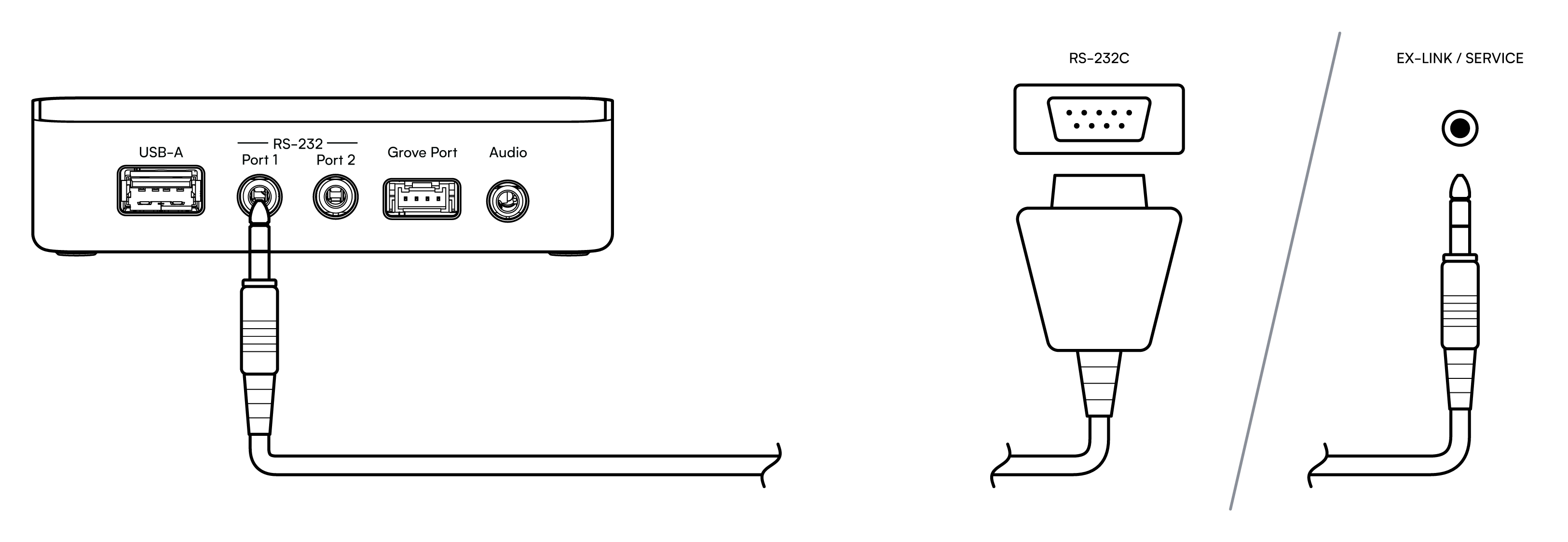
Connect the serial port of your TV or receiver to RS-232 Port 1 or Port 2. See Cabling and adapters.
-
In Home Assistant, add the integration for your device.
- During setup, select the Connect AUX-2 port from the list of serial ports. Connect AUX-2 has two serial ports, RS-232 Port 1 and RS-232 Port 2. Select the one you plugged the cable into.
Warning
Connect serial equipment to RS-232 Port 1 or Port 2 only, never to the 3.5 mm audio output. See the port warning in Ports and controls.
For other devices and the TX/RX switch, see Controlling devices over serial. For an extra serial port or an RS-485 device, see Using a USB-to-serial dongle.
Troubleshooting
If your TV or receiver doesn't respond:
- Check that you selected the port you plugged the cable into, RS-232 Port 1 or RS-232 Port 2.
- Try the other TX/RX switch position.
- Check the converter cable and its pinout. See Cabling and adapters.
- LG and Samsung TVs have extra requirements, such as a setting to turn on in the TV. See the prerequisites for LG TV and Samsung TV via ExLink.